

Last Updated: November 4, 2026
Quick Summary
Smart thermostat compatibility with older HVAC systems depends on four things: available wires, system voltage, equipment type, and control board behavior. Most older systems lack a C-wire, so the thermostat cannot draw the steady 24V power it needs. Check your wire count and voltage before buying.
- A C-wire completes the 24V power circuit and smart thermostats need it for Wi-Fi and displays.
- Count the wires behind your thermostat: five or more with C landed means direct compatibility.
- Test between R and C with a multimeter set to AC voltage; a healthy circuit reads close to 24V AC.
- Line-voltage systems run on 120V or 240V and will destroy a standard low-voltage smart thermostat.
- A C-wire adapter repurposes the fan wire but does not solve line-voltage or some heat pump systems.
Table of Contents
- Why Older HVAC Systems Often Fail Smart Thermostat Compatibility Checks
- Smart Thermostat C-Wire Requirements Explained
- How to Check HVAC Thermostat Wiring Before You Buy
- System Voltage: Low-Voltage vs Line-Voltage and What It Means for Smart Thermostats
- C-Wire Adapter Installation: What It Solves and What It Doesn’t
- Variable Speed Motors, Heat Pumps, and Two-Stage Furnaces: Where Compatibility Gets Tricky
- Smart Thermostat Alternatives for Baseboard and Line-Voltage Heating
- Schedule a Smart Thermostat Compatibility Check With 1st Service HVAC
- Frequently Asked Questions
Why Older HVAC Systems Often Fail Smart Thermostat Compatibility Checks
Smart thermostat compatibility with older HVAC systems comes down to one thing: whether your system can supply the small, steady trickle of power a smart thermostat needs to run its screen, Wi-Fi chip, and processor.
The four things that decide compatibility are:
- Available wires. Does your thermostat cable have a spare conductor for a common wire?
- System voltage. Is your system low-voltage (24V control) or line-voltage (120V/240V)?
- Equipment type. Standard single-stage, or something more complex like a heat pump or variable-speed blower?
Miss any one of these and the thermostat may power on, then drop offline, reboot randomly, or fail to switch the equipment at all.
Smart Thermostat C-Wire Requirements Explained
A C-wire (common wire) completes the low-voltage power circuit between your HVAC equipment and your thermostat. Without it, a smart thermostat has to steal power through the other wires, which works on some systems and fails on many older ones.
What the C-Wire Actually Does
The C-wire carries the return path for 24-volt power from the transformer. Basic thermostats don’t need it because they run on battery. Smart thermostats draw continuous current for Wi-Fi and displays, so they need a dedicated path back to the transformer. The U.S. Department of Energy’s guide to thermostats explains how programmable and smart controls cut heating and cooling waste, but the control wiring has to support the device first.
2-Wire vs 4-Wire vs 5-Wire Systems
- 2-wire: Heating only, or cooling only. No fan control, no C-wire. Smart thermostats usually won’t work here without added wiring.
- 4-wire: Heat, cool, fan, and one power leg. Common in older forced-air setups. Often no spare conductor for a C-wire.
- 5-wire: Heat, cool, fan, plus both power legs, including the common. This is the configuration smart thermostats want.
Count the wires in the cable behind your thermostat. If you see four or fewer, expect to deal with a C-wire workaround.
How to Check HVAC Thermostat Wiring Before You Buy
Checking your thermostat wiring is a simple process that typically requires one tool: a digital multimeter. Turn the power off at the air handler first, not just at the thermostat, then remove the faceplate and photograph the terminal block before you touch anything.
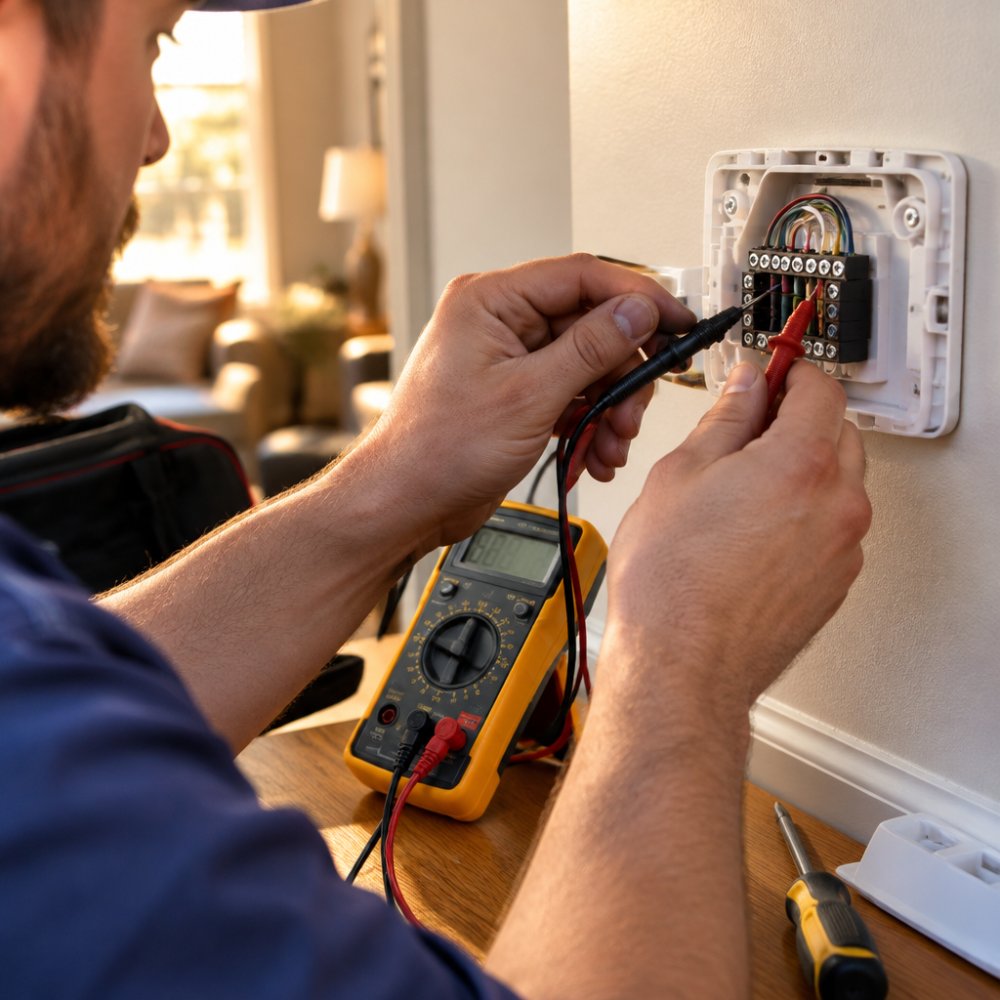
Reading the Terminal Block and Identifying Wires
The letters on the terminal block tell you what each wire does. The standard low-voltage designations are:
- R or Rc/Rh: 24V power from the transformer (Rc is cooling-side power, Rh is heating-side power; a jumper connects them on single-transformer systems)
- W (W1, W2): Heat stage 1 and stage 2
- Y (Y1, Y2): Cool stage 1 and stage 2
Write down every letter that has a wire landed on it, then compare that list to the terminal labels on the smart thermostat you’re considering, every spec sheet lists which terminals it supports. If your equipment uses a terminal the thermostat doesn’t have (a second-stage W2 or Y2, an O/B reversing valve, or an AUX/E lead), the thermostat either won’t control that function or will require a model that supports it.
Wire Color Conventions, and Why You Can’t Trust Them
Most installers follow a loose color convention: red on R, white on W, yellow on Y, green on G, blue or black on C, orange on O/B. But older homes are full of surprises, a previous owner or a rushed installer may have used any conductor for any terminal. Never assume color equals function. The terminal letter is the authority, not the wire jacket.
The Multimeter Test That Confirms Your C-Wire
With the air handler power restored and the thermostat removed, set your multimeter to AC voltage and test between the R terminal and the C terminal. A healthy low-voltage control circuit typically reads close to 24V AC.
Watch out: Testing voltage with the thermostat connected and the system calling for heat or cool can give false readings and risks shorting a conductor against the terminal block, always pull the thermostat and isolate the wires first.
The Decision Tree: What Your Wire Count Tells You
Count the conductors in the cable behind the thermostat, then match to the outcome:
- 5 or more wires with C landed: Direct compatibility with most smart thermostats. Confirm the thermostat supports any extra terminals (W2, Y2, O/B) your equipment uses.
- 4 wires, no C, but a spare conductor tucked in the wall: You can land the spare on C at both the thermostat and the control board, the cleanest fix.
- 4 wires, no spare, standard forced-air system: A C-wire adapter (power extender kit) is the usual path. See the adapter section below.
If C is empty and there’s no spare wire tucked in the wall, you have three options: run new cable, install a C-wire adapter, or pick a thermostat that doesn’t need a C-wire. For a deeper look, see our guide to the best HVAC system for old homes.
Tools and Safety Basics
You need a digital multimeter, a small flathead and Phillips screwdriver, wire labels or masking tape, and your phone camera. Turn off the air handler disconnect, not just the thermostat, before touching conductors. Low-voltage 24V won’t seriously hurt you, but a shorted conductor can blow the low-voltage fuse on the control board, and on older systems that fuse can be soldered in place and expensive to replace.
Count the conductors behind your thermostat and match the result to the outcome below.
| Wire count | What it means | Next step |
|---|---|---|
| 5 or more wires with C landed | Direct compatibility with most smart thermostats | Confirm support for W2, Y2, O/B |
| 4 wires, no C, spare conductor in wall | Spare can be landed on C at both ends | Cleanest fix |
| 4 wires, no spare, standard forced-air | Missing C-wire | C-wire adapter is the usual path |
| 2 or 3 wires | Heating-only or cooling-only legacy system | Added wiring or adapter needed |
| Line-voltage wiring, no low-voltage terminal block | 120V/240V system | Standard smart thermostat not compatible |
System Voltage: Low-Voltage vs Line-Voltage and What It Means for Smart Thermostats
Voltage is the deal-breaker most people skip. Standard central heating and cooling runs on low-voltage 24V control circuits. Electric baseboard heaters and some older in-wall units run on line-voltage, typically 120V or 240V.
A low-voltage smart thermostat wired to a line-voltage heater will be destroyed the moment power comes on. If you’re unsure of your furnace type, our gas furnace page shows the equipment we install and the specs that matter.
Test with a multimeter set to AC voltage across R and C. Reading around 24V confirms low-voltage control.
Reach out to us for more information… →
C-Wire Adapter Installation: What It Solves and What It Doesn’t
A C-wire adapter, sometimes called a power extender kit, repurposes the fan wire to deliver constant power to the thermostat. It solves the missing-C-wire problem on many standard forced-air systems.
What it doesn’t solve:
- Line-voltage systems (adapters don’t apply)
- Heat pumps with a reversing valve that needs the fan wire
- Boards with no compatible terminal to land the adapter leads
Installation means opening the air handler and landing leads on the control board. If you’re weighing an adapter against a system upgrade, our high efficiency variable capacity heat pump systems page covers what a modern replacement looks like.
Variable Speed Motors, Heat Pumps, and Two-Stage Furnaces: Where Compatibility Gets Tricky
Complex equipment is where compatibility checks get real. Variable-speed blowers use ECM motors that communicate with the control board, and heat pumps add a reversing valve terminal.
Your thermostat has to be configured for the exact equipment you have.
If you have a heat pump or variable-speed system, check our heat pumps page to confirm what your equipment needs before you buy a thermostat that can’t talk to it.
Smart Thermostat Alternatives for Baseboard and Line-Voltage Heating
Line-voltage heating, electric baseboard, in-wall fan-forced heaters, and some older radiant panels, runs on 120V or 240V at the heater, not the 24V control circuit a standard smart thermostat expects. Wiring a low-voltage smart thermostat directly to a line-voltage heater will destroy it the moment power comes on, and the reverse won’t work either. But ‘not compatible’ is not the end of the story: there are three practical paths.
Path 1: Line-Voltage Smart Thermostats Built for the Job
A handful of manufacturers make smart thermostats designed specifically for line-voltage baseboard and in-wall heaters. These units switch the full 120V/240V load internally and are rated by amperage, commonly 15A or 16A per circuit, which covers most single baseboard runs. They typically offer Wi-Fi scheduling, geofencing, and app control, and some support multiple zones. The trade-off: they’re usually single-zone devices, so a home with five baseboard zones needs five units.
Path 2: The Relay Workaround, a Low-Voltage Smart Thermostat Driving a Line-Voltage Load
This is the angle most guides miss. You can keep a standard low-voltage smart thermostat and still control line-voltage baseboard heat by inserting a relay (also called a contactor or power relay) between the thermostat and the heater.
A few practical notes on this approach:
- The relay must be rated for the heater’s voltage and amperage, a 240V, 20A or 30A contactor is typical for baseboard circuits.
- The smart thermostat still needs a 24V power source, which usually means a small plug-in transformer or a 24V transformer wired into the circuit.
- This is a job for a licensed electrician or HVAC technician, not a weekend project: you’re mixing line-voltage and low-voltage wiring in the same enclosure, and the code requirements for separation and grounding are strict.
Watch out: A relay wired with the coil on the wrong voltage, or a contactor undersized for the heater’s amperage, can overheat and become a fire hazard, confirm the relay’s ratings against the heater nameplate before energizing anything.
Path 3: Zone Controllers and Smart Plugs (Limited but Cheap)
A zone controller adds smart scheduling to existing baseboard circuits without replacing each thermostat, useful when you have several heaters on one circuit and want centralized control. For portable heaters only, a smart plug rated for the heater’s wattage can add scheduling, but never use a smart plug on a hardwired baseboard heater: it isn’t rated for continuous high-amperage load and isn’t a substitute for a proper line-voltage thermostat.
What These Options Cost and When They Make Sense
The relay approach typically involves more up-front equipment and labor, but it lets you standardize on one smart thermostat platform across a mixed system. If your goal is simply to stop heating empty rooms, a line-voltage smart thermostat per zone is usually the cheapest path; if you want one app for the whole house, the relay approach is worth pricing out with a contractor.
These alternatives cost less than rewiring and keep you from damaging equipment. Match the thermostat to the heater’s voltage and amperage rating, and mount it per the manufacturer’s instructions.
Schedule a Smart Thermostat Compatibility Check With 1st Service HVAC
Guessing at wiring can get expensive. A compatibility check confirms your voltage, wire count, and equipment type, so you buy the right thermostat the first time. As a family-owned business with licensed professional HVAC technicians, we check the system, not just the wall plate.
If you need new equipment or want a compatibility check before a thermostat purchase, our furnace installation page is the place to start.
Frequently Asked Questions
Do smart thermostats work with old furnaces?
Many do, but it depends on the wiring and control board. A smart thermostat needs a steady low-voltage power source, usually through a C-wire, and a compatible terminal layout. Older furnaces with two or four wires often lack a C-wire, so you may need a power extender kit or an adapter. Check the terminal block and confirm your system runs on 24-volt low voltage before buying.
How do I know if my HVAC system is compatible with a smart thermostat?
Start by shutting off power at the breaker and removing your current thermostat. Photograph the terminal block and note which wires connect to R, W, Y, G, and C. If you see a C terminal with a wire attached, most smart thermostats will work. If not, check whether your system is low-voltage or line-voltage, then use the manufacturer’s compatibility checker or call an HVAC technician to confirm.
Can I install a smart thermostat without a C-wire?
Yes, in many cases. A C-wire adapter installation, sometimes called a power extender kit, draws power from the control board and gives the thermostat a constant low-voltage supply without running new wire through your walls. Adapters work on most forced-air furnaces and heat pumps, but they are not compatible with line-voltage baseboard heating. Confirm your system type first.
What are the common compatibility issues with older HVAC systems?
The most frequent problems are missing C-wires, line-voltage baseboard heating that smart thermostats cannot control, and variable speed blower motors that need specific terminal connections. Two-stage furnaces and heat pumps also require thermostats that support multi-stage or heat pump wiring. A quick voltage test and terminal inspection will flag most of these issues before you buy.
Your thermostat should make your home more comfortable, not leave you guessing why the heat won’t come on. Call 1st Service HVAC to schedule a smart thermostat compatibility check, and our team will confirm what your system supports before you buy. Get started with 1st Service HVAC and get the right thermostat for your home the first time.
